Risk assessments
An assessment is written in four steps, each building on the one before. You cannot skip ahead, because a hazard without a job step has nothing to attach to.
The four steps
- Job detailsName the job, describe it, and break it into the sequence of steps the crew will carry out. Steps can be reordered by dragging.
- HazardsFor each job step, what could realistically go wrong before controls are applied.
- ConsequencesFor each hazard, the credible outcomes — and the initial risk score for each.
- MitigationsFor each consequence, what you are doing about it, and the residual score once those measures are in place.
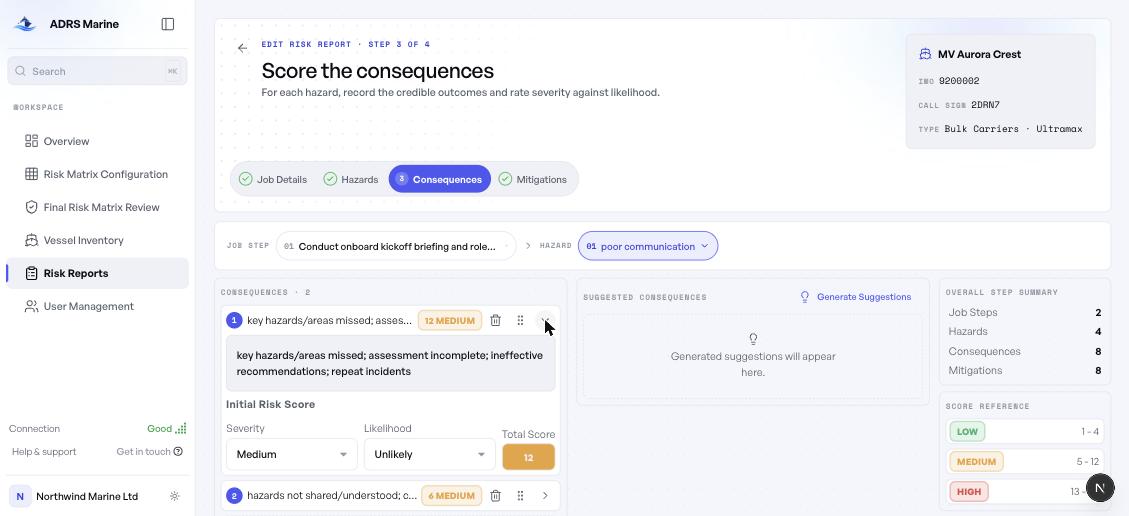
Scoring
Expand a consequence to score it. Choose a severity and a likelihood; the total is calculated and banded automatically. The figure counts to its new value and the tier colour changes with it, so a score crossing from Medium into High is visible rather than something you have to notice.
Step three records the risk as it stands. Step four records it after your mitigations. An assessment cannot be completed until every consequence has both.
Your work saves itself
Assessments save a moment after you stop typing. The header shows the state — Unsaved changes, Saving, Saved — so you never have to wonder.
- Closing the tab by accident does not cost you the session.
- If the connection drops, changes are held and sync when it returns.
- Leaving with unsaved work prompts you first.
AI suggestions
Each step offers Generate Suggestions, grounded in maritime regulation and in the vessel type you are assessing. Suggestions are proposals: click one to adopt it, edit it afterwards, or ignore them entirely.
They are a starting point for an experienced assessor, not a replacement for one. Nothing is added to your assessment unless you choose it.
Copying an existing assessment
Many jobs repeat across a fleet. Generate Report → Copy existing duplicates a previous assessment's structure into a new one, landing you on whichever step still needs work.