Preferences
Appearance settings are stored on the device you are using, so changing them does not affect your colleagues.
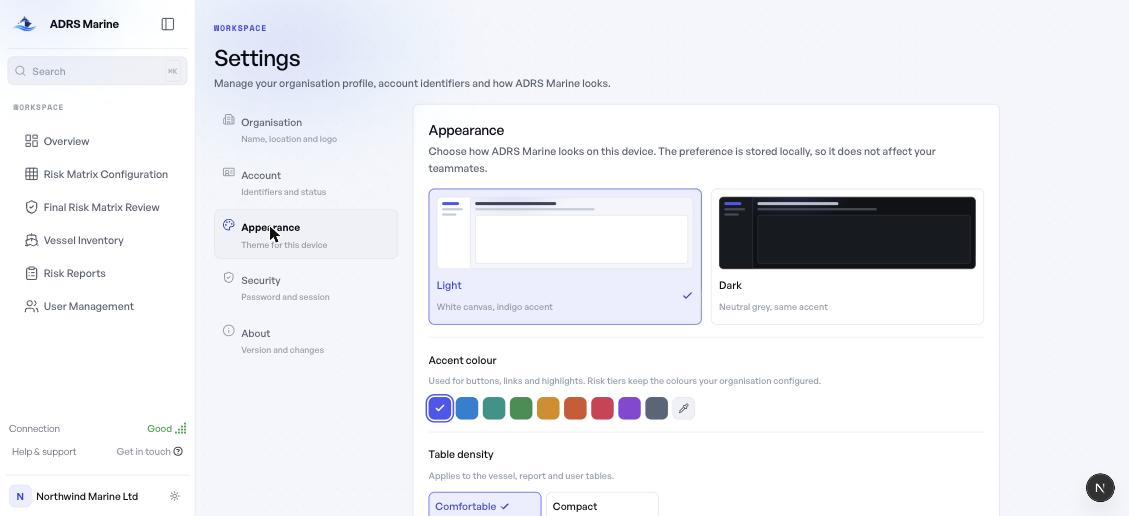
Theme
Light or dark. Light is the product's primary skin; dark is the same product in a neutral grey shell. Switching dissolves between the two rather than flipping in a single frame.
Accent colour
Nine presets, or any colour you like through the picker. The accent is used for buttons, links and highlights.
Your risk tier colours stay exactly as your organisation configured them. Those carry meaning and are not a matter of taste. The platform also adjusts text on top of your accent automatically so it stays readable, whatever you pick.
Table density
Comfortable or Compact, applied to the vessel, report and user tables. Compact fits noticeably more of a fleet on screen.
Connection
The sidebar shows the quality of your connection to the platform, measured from the requests the app is already making — nothing extra is sent, which matters on a metered satellite link. If the connection drops entirely you are told, and your work is held until it returns.
Account
Settings — Account shows the identifiers your workspace is keyed on: your login ID, the company it belongs to, and the account’s status. These are read-only — they are what ADRS Marine and your administrator set.
Security
Settings — Security is where you change your password and end your session. Use this rather than the forgotten-password flow when you already know your current password: it is immediate and involves no emailed code.
Version and what changed
Settings → About shows the version running on your device and the release notes for it. A dot appears beside What's new in the account menu when there are notes you have not read.