Fleet registry
Every assessment belongs to a vessel, so the fleet registry is the second thing to set up after the risk matrix.
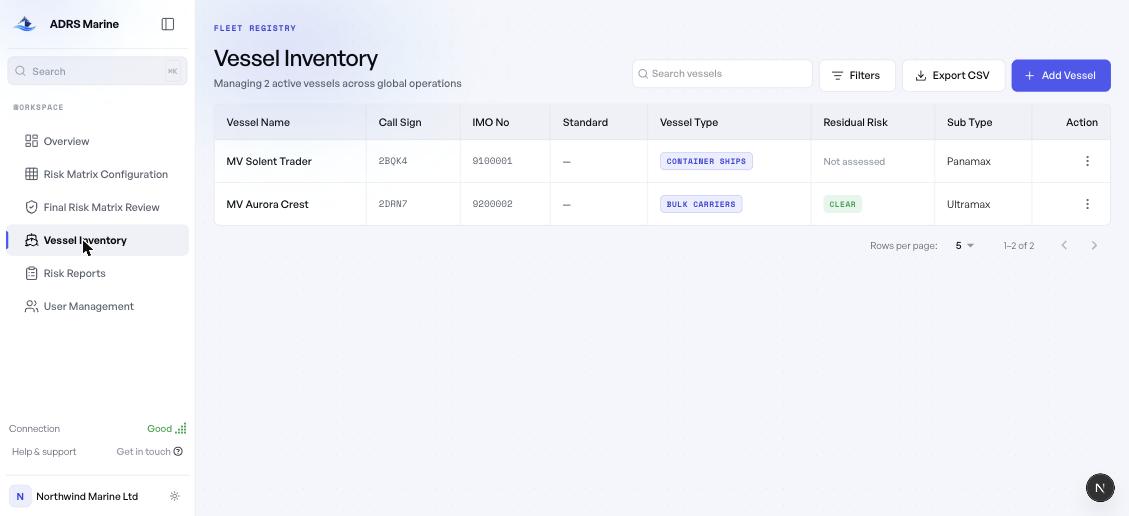
Adding a vessel
Choose Add Vessel. The identifying fields are the vessel name, IMO number and call sign. Type and sub-type drive the hazard suggestions offered later, so they are worth setting accurately.
Reading the list
| Column | Notes |
|---|---|
| Vessel Name | Opens the vessel. The whole row is clickable. |
| Call Sign / IMO No | Shown in monospace because they are identifiers, not prose. Both are searchable. |
| Vessel Type / Sub Type | Used to tailor hazard suggestions. |
| Residual Risk | Clear when no high risks remain, otherwise a count. Not assessed means no assessment exists yet. |
Finding a vessel
The search box matches on name, IMO number, call sign and type — crews look a ship up by whichever they have to hand. Filters narrows by vessel type, and Export CSV exports whatever the current filters show, not the whole fleet.
The vessel record
Opening a vessel shows its identity and engineering detail, and its assessment history — every report written against that hull, with its risk profile. This is the quickest way to answer "when was this ship last assessed, and what did we find?"